THE TRADING WORKSPACE FOR HYPERLIQUID

Your strategy.
Amplified by AI.

Read the market, build a trade plan and test your ideas. Charts, AI and Paper Trading in one workspace—with every trading decision in your hands.

Browser access · iPhone, iPad & Mac via TestFlight

Compare platforms
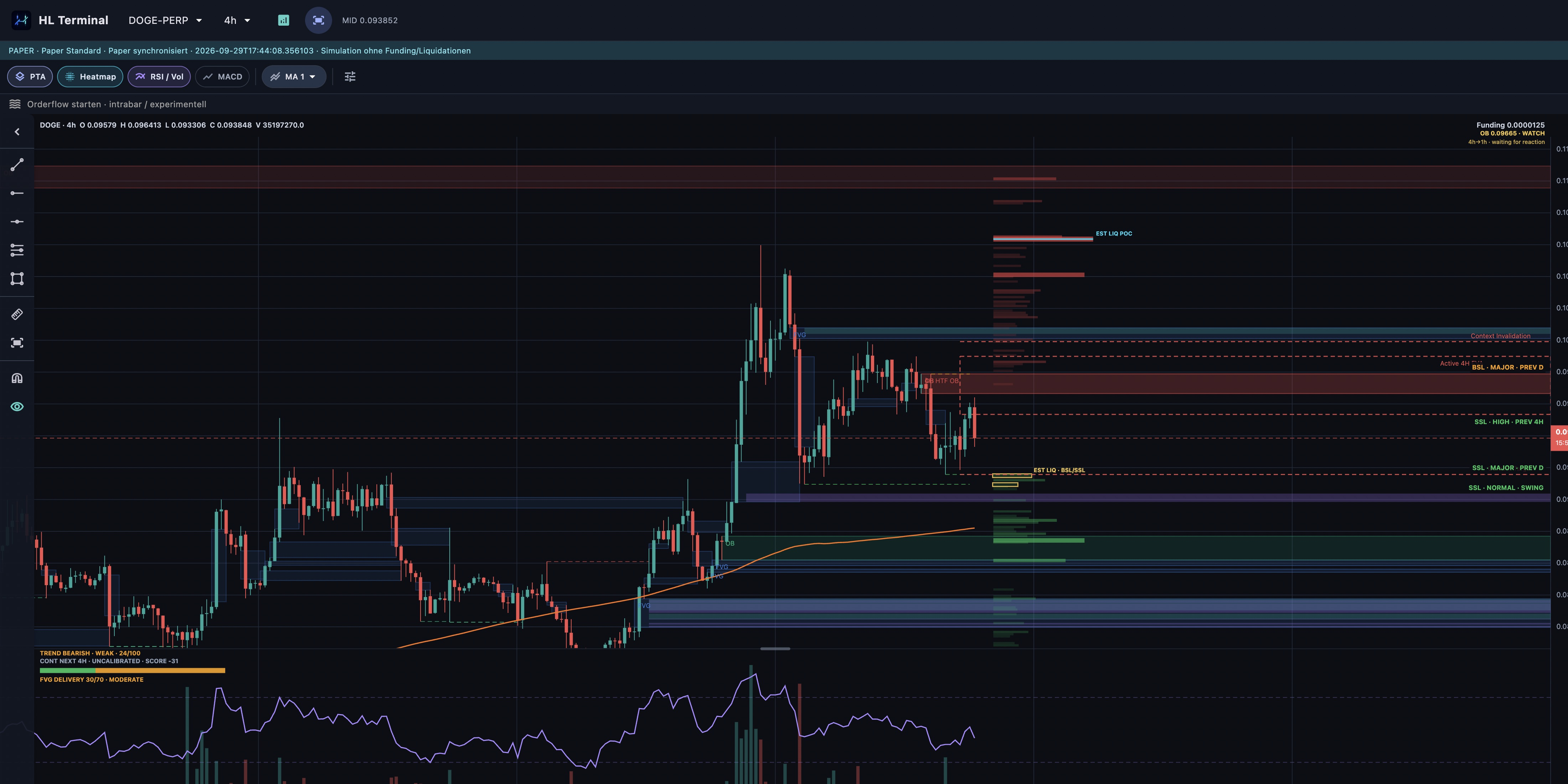
YOUR TRADING WORKSPACESMC · PAPER TRADING
HL Terminal chart showing SMC zones and a Paper Trading banner
Live market data. Your own analysis.

ONE CONNECTED WORKFLOW

Explore. Plan. Follow.

From chart evidence to a plan you can review, test and track.

01 / READ THE MARKET

Find the context behind the move.

Read market structure, liquidity sweeps, Order Blocks and Fair Value Gaps with the native PTA indicator. Trading Contexts bring direction, zones, targets and invalidation together across your favorite markets.

Explore the PTA & SMC guide

Trading Contexts table showing direction, state, invalidation and targets across several markets
Trading Contexts · open the screenshot to inspect the details

02 / PLAN AND TEST

Give every idea a plan.

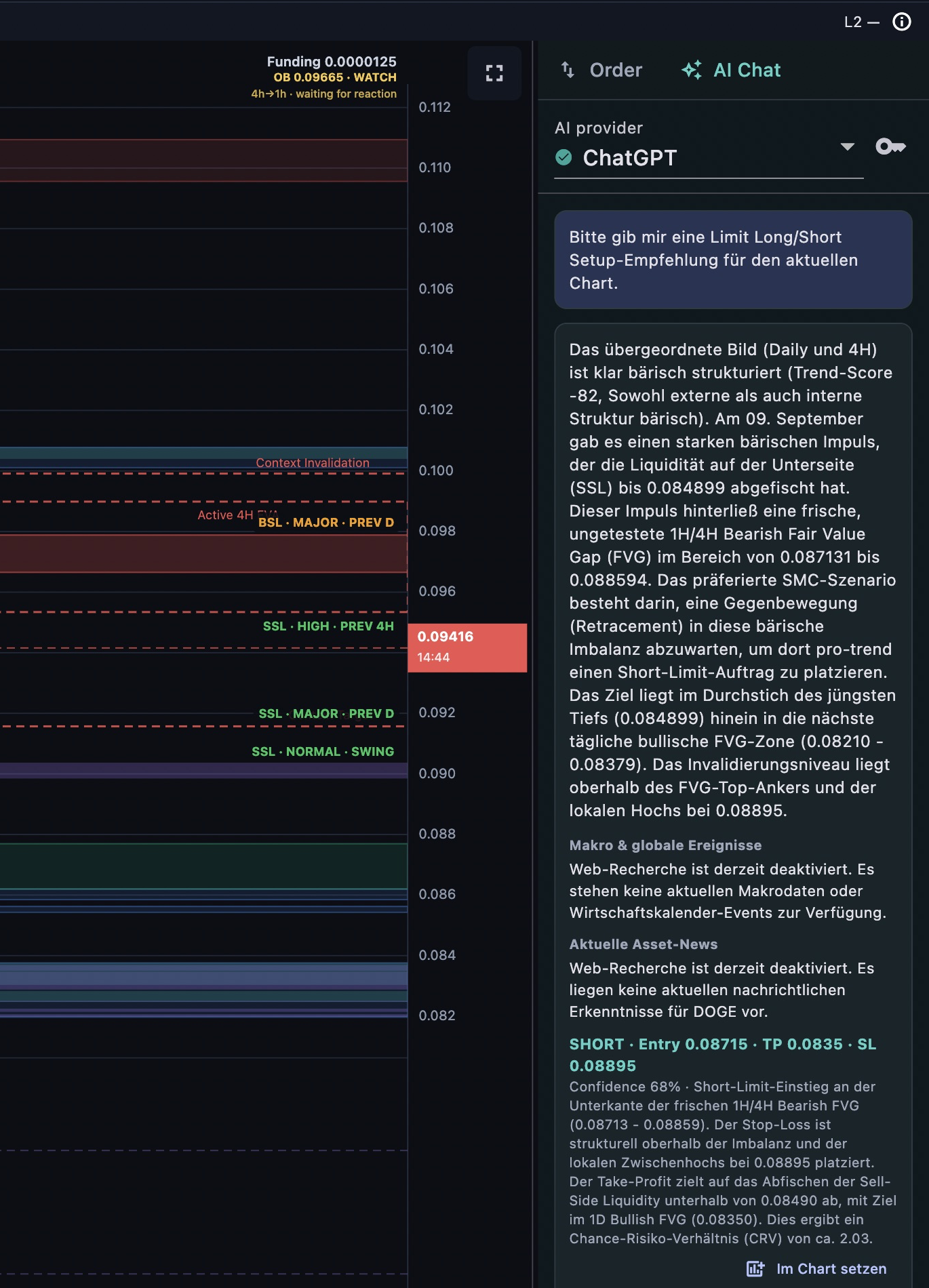
Discuss a chart with the in-app AI assistant or connect Codex on your Mac. Review suggested entries, stops and targets, then refine the setup on the chart and in the order ticket.

Practice with virtual capital. Paper Trading starts with 100,000 virtual USDC. Use separate accounts to compare strategies and follow equity, fees and drawdown.

Watch the Paper Trading introduction
In-app AI Chat with a chart analysis and a proposed trade setup
AI Chat · your own provider and API key

03 / FOLLOW YOUR SETUP

Stay with the opportunity.

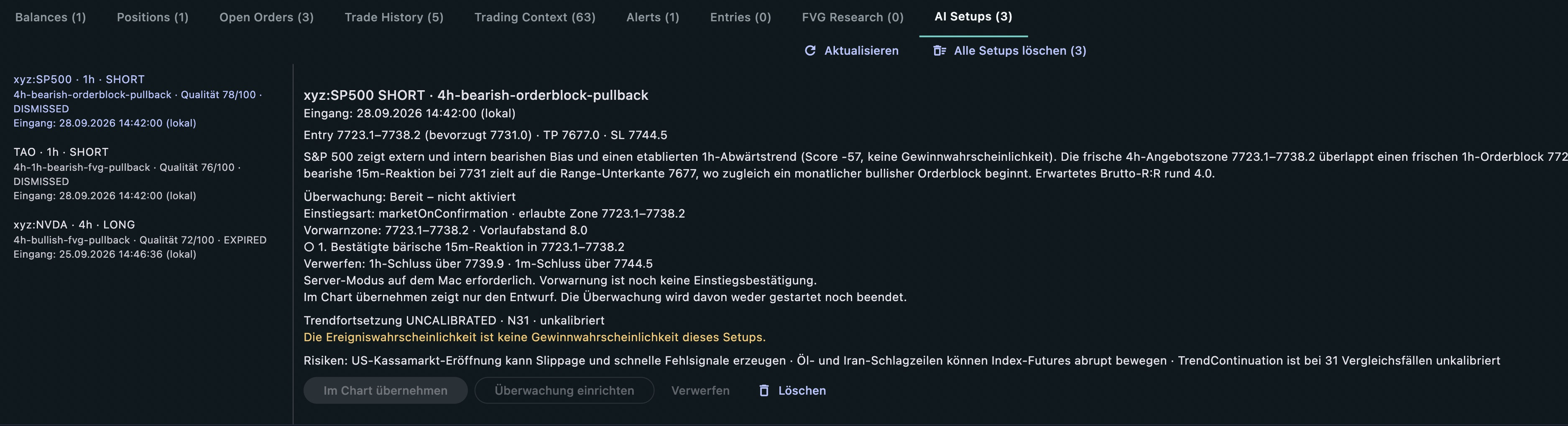
Bring AI recommendations into your review inbox with their rationale and trade levels. On the native Apple apps, activate a monitoring plan and receive notifications when your conditions are met.

Continuous native monitoring runs on a synced Mac in Server Mode. You review the evidence and submit every live order yourself.

Learn about monitoring and alerts
AI Setups inbox showing draft trade levels and monitoring state for manual review
AI Setups · review, refine and activate monitoring

Screenshots show the current German app interface in Paper Trading mode.

CHOOSE WHERE TO START

Your browser. Your Apple devices.

Charts, Paper Trading, AI Chat and manually submitted live orders are available on both. Sync, Codex and native monitoring depend on your platform.

WEB APP

Open and explore.

Use HL Terminal directly in your browser. Paper accounts use a separate hosted ledger; browser settings stay local. Trading and AI keys are protected with a local passkey vault.

Open web app

IPHONE · IPAD · MAC

Get the Apple beta.

Install the native app through Apple TestFlight. Supported workspace data and native Paper accounts sync through your own iCloud account.

Join on TestFlight
How to install the beta
  1. Open the invitation on your iPhone, iPad or Mac.
  2. Install Apple TestFlight if needed.
  3. Accept the invitation and install HL Terminal.
What is available on each platform
FeatureWebApple apps
Charts, SMC & Trading ContextsAvailableAvailable
Paper TradingSeparate browser accountsNative accounts via iCloud
AI Chat & trade planningYour own AI API keyYour own AI API key
Live ordersPasskey vault + exchange verificationLocal API wallet + exchange verification
Workspace sync via iCloudUnavailable in the public web buildAvailable
Local Codex / MCP connectionUnavailablemacOS only · same Mac
Native setup monitoring & pushUnavailableVia a synced Mac in Server Mode

LEARN AND EXTEND

Go deeper when you are ready.

GETTING STARTED

Practical walkthroughs.

Start with Paper Trading, explore AI Chat or set up monitoring. Four videos, organized by task and platform.

Watch the HowTo videos

PTA & SMC

Understand your chart.

Read the annotated PTA chart and explore selected background lessons on FVGs, Order Blocks, context and price reactions.

Open the chart guide

CODEX · MACOS

Connect your AI workspace.

Scan markets, review Trading Contexts and bring advisory setups into the terminal with the local Codex plugin.

Get the plugin and guide

BEFORE YOU START

A few useful details.

Choose a workflow that fits your devices and the way you want to explore markets.

Can I start without a trading wallet?

Yes. Explore charts and use Paper Trading with virtual funds. Live orders require your own Hyperliquid account, a configured API wallet and current exchange verification. Opening the app or viewing Mainnet prices does not authorize a live order.

What do the AI features require?

In-app AI Chat uses your own API key for a supported provider. Codex requires your own Codex access and the local macOS plugin. AI usage follows your provider’s plan and limits.

When do I need a running Mac?

For the local Codex connection and continuous native setup monitoring, keep the macOS app running in Server Mode. Browser Paper Trading uses its own hosted ledger. Native Paper accounts sync through iCloud and are separate from browser accounts.

Watch the Server Mode walkthrough
Does AI place trades automatically?

No. AI prepares analysis and advisory setups for your review. You choose the plan and manually submit every live order. The Codex bridge cannot place, change or cancel orders.